


Categories
- General catalogue 2024. PDF. FREE
- CHEMICALS
- ROBOTS
- POOLS
-
PUMPS
- PUMPS - compare any pumps
- Emaux pumps
- Speck pumps
- ESPA pumps
- Hayward pumps & parts
- Pumps for above ground pools
- Variable speed pumps
- 380V Pumps
- Spa and swimjet pumps
- Very heavy duty commercial pumps
- Astral™ pumps
- PUMP ACCESSORIES
-
PUMP SPARE PARTS
- Emaux SS Series parts
- Emaux SC Series parts
- Emaux SB Series parts
- Emaux SR Series parts
- Emaux SPH Series parts
- Emaux EPH Series parts
- Emaux EPV Series parts
- Emaux UPH Series parts
- Emaux ET Series parts
- Emaux ETV Series parts
- Emaux AFS Series parts
- Emaux AquaMini AMU parts
- ESPA (all series) parts
- SPECK (all series) parts
- Hayward spare parts
- FILTERS
- FISH POND and aquaculture systems
- FILTER SPARE PARTS
- COMPLETE FILTRATION SYSTEMS and portable systems
- FILTER MEDIA: sand, Zelbrite, glass, D.E. powder, cartridges
- SPECIAL OFFERS - filters, pumps, lights, chlorinators
- EQUIPMENT, Fixtures, Fittings, skimmers, grating, ladders, unions, plumbing, safety
- VALVES and UNIONS
- SPA fittings, pumps, blowers, jets, electrics
-
LIGHTING
- Underwater lighting
- Fountain, water feature lighting
- Deck & Floor lights
- SPARE BULBS (globes) and LED panels
- SPECIAL OFFERS
- ELECTRICAL EQUIPMENT
- DISINFECTION systems for pools, spas, fish ponds, chlorinators, Naked, ionisers, UV, etc
- CHEMICAL DISPENSERS, Chlorine tablet dispensers, Automatic dosing, etc
- WATER TESTING and analysis
- CLEANING & MAINTENANCE Tools
- HEATERS
- COUNTER CURRENT Swim Jet systems
- WATER FEATURES, waterfalls, fountains, fun, and water park flumes
- DIVING BOARDS, SLIDES, FLUMES
- Complete technical packages for DIY pools
- Power showers
- Competition equipment
- WATER SOFTENING systems
- SAUNA cabins, heaters, steam, accessories, spares
- Underwater FITNESS equipment
- Health products
- SPARE PARTS
- Installation, Service, & Water Analysis
- Emaux pumps spare parts
- POOL DESIGN SERVICES & CONSTRUCTION
- CONSTRUCTION MATERIAL, glue, waterstop, tiles, tools, etc
- Field Service and home consultations
- Workshop Services / REPAIRS


How to find a product and place your order
Part 2: MAKE YOUR ORDER AND PAY
There are over 3,000 products on our site, but the categories and the shopping cart are displayed on every page - you will always know where you are and you will not need to call our sales staff for help!
To make them easier to find, some products appear in two or more categories.
Comparing products: For some types of products there is a category that includes all models of all their sub-categories. Use these 'All pumps' or 'All filters' categories to compare products from different sub categories:
 or sort them by various criteria
Links:
1. Navigation bar
2. Banners
3. Frequently purchased products
4. Category lists
5. Sub Category icons
6. Search field
7. Category product list
8. The product's page
1. Navigation bar to the most common products

2. Some popular product series have clickable banners:
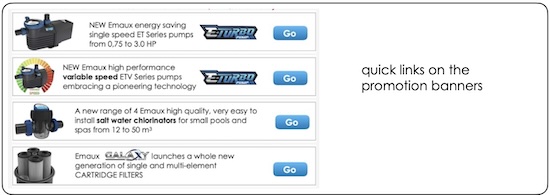
3. Some frequently purchased products are featured on the home page. If you see what you want, you can already add the product to your cart here:
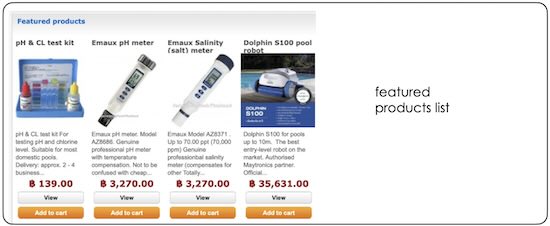
4. All other products can be found in their categories and sub categories:
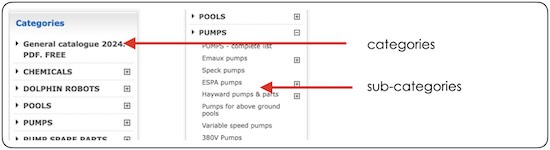
5. Clicking on the category's icons will take you to the products and their spare parts. For easy navigation some products are listed in several categories:
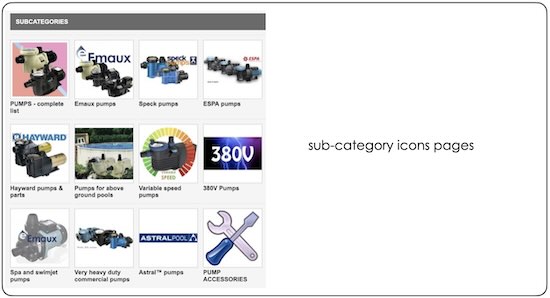
6. If you basically know what you want, you can search for it by its name, a keyword, or its catalogue number:

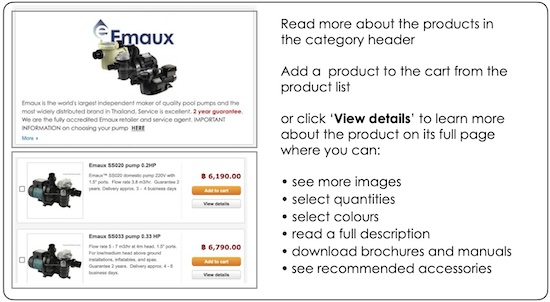
7. A category page provides important information in the header and a list of the products in the category. If you know what you want, you can already add a product to your cart here:
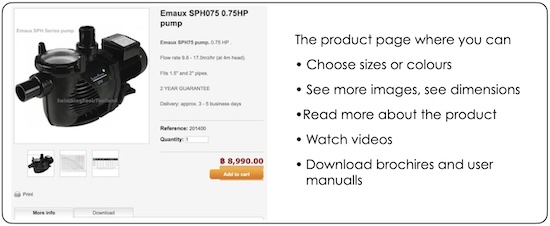
8. If you want more information, click 'View details' to open the product's full page to see much more information,videos, and downloads:
Part 2. Placing and pyour order
Part 2: PLACE and PAY for YOUR ORDER
Making an order is easy, in fact it's much quicker than it takes to read these 'step-by-step' instructions but you will not need to call our sales staff for help.
Links:
9. The shopping cart
10. Cart summary,
11. Addresses, order comments
12. Shipping and T&C
13. Payment selection
14. Payment by bank transfer (iBanking, ATM, Cash)
14.1. Payment by PromptPay QR code
15. Payment by PayPal and Credit Card (limited)
Making an order is easy, in fact it's much quicker than it takes to read these 'walk-through' instructions but you will not need to call our sales staff for help.
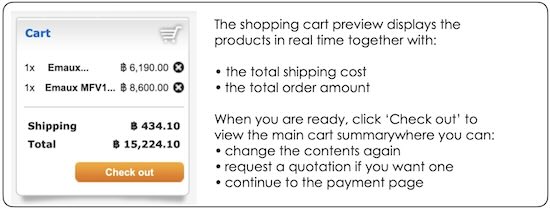
9. The shopping cart is displayed on every page of this website. Adding products to it also immediately displays the shipping cost and the total in real time:
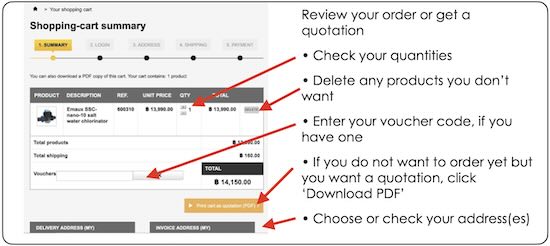
10. The cart summary is where you check your order and make any changes, add a voucher code, or get a quotation:
11. Addresses, order comments:
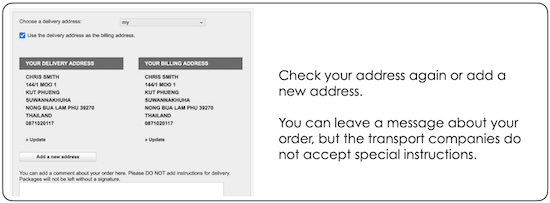
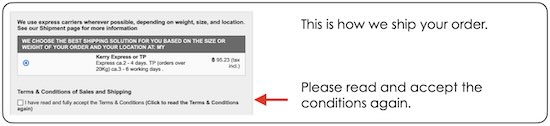
12. Shipping and T&C. It is important to read the Terms & Conditions:
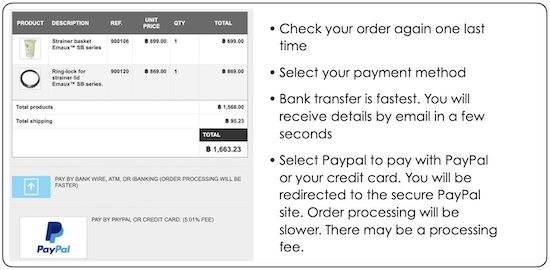
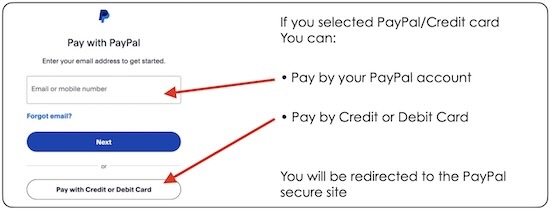
13. Payment selection (more instructions at HOW TO PAY). You don't need a PayPal account to pay by credit card. For some products we do not accept PayPal or Credit card payments:
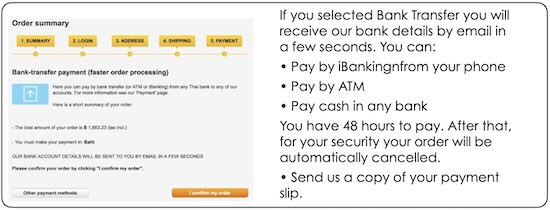
14. Bank transfer (see also How to pay by BANK TRANSFER):
14.1. Bank transfer by PROMPT PAY(see also How to pay by BANK TRANSFER)
If your Thai bank account is set up for PromptPay, scan the QR code and enter the amount.

15. Payment by PayPal or Credit card (see also PayPal/Credit card). You don't need a PayPal account to pay by credit card. For some products we do not accept PayPal or Credit card payments:
• Robots
• Pumps over ฿20,000.00
• Chlorinators, UV systems, Ionizers over ฿20,000.00
• Large orders over ฿ 20,000.00
• In-field services and consultations over ฿20,000.00
Cart
Specials
-
-
BSV N-BSALT-20
฿ 66,991.59 ฿ 36,845.37
Information
- Shipping
- Payment
- Choosing your swimming pool filter at SwimmingPoolsThailand shop
- Thailand Pool Shop Terms and conditions
- Public Holidays in Thailand 2026
- Swimming pool builder in Isan, Isaan, Chiang Mai
- Pump Guide
- Ionzers
- Privacy policy
- Cookie policy
- SwimmingPoolsThailand chemical guide
- Salt water pools
- The EMAUX guarantee
- Testimonials
- Why are Dolphin robots so popular?
- Ionizers
- ClearBlue - additional advice